Twitter and StumbleUpon are one of my main Source of Traffic next to Google. You can Shorten your StumbleUpon Link with Su.pr. The more likes you get in stumble means high visibility in StumbleUpon, which will increase the traffic to your blog. You can now Simply use Su.pr Short links in Tweetmeme by changing the URL shortener service in Tweetmeme. Here is the simple tutorial.
The Below trick applies to both WordPress and Blogger blogs if you have added tweetmeme buttons using codes.
1.To Get su.pr API Key
Login to Su.pr and goto Settings and copy your API Key

2. To added su.pr API key in Tweetmeme
If u have already installed the Tweetmeme Button
then just add tweetmeme_service =’su.pr’; and service_api = ‘Paste your Su.pr API here’; in tweetmeme script tags.
After adding the codes your Script look Like the Below
<script type=”text/javascript”>
tweetmeme_service = 'su.pr';
service_api = 'YOUR_API_KEY';
</script>
<script type="text/javascript" src="http://tweetmeme.com/i/scripts/button.js"></script>
This will Add Change the default Shortener to su.pr
FOR LIVE DEMO CHECK OUT MY TWEETMEME BUTTON.
For WordPress Users who uses Tweetmeme Plugin:
I have tested this with the following plugin:
- Tweetmeme Button
- Version: 1.9
- Author: TweetMeme
- You can Get the Plugin From Here
Now goto Dashboard -> Tweetmeme
Goto Settings for Button Integration -> now in URL Shortner you wont find su.pr that drop down menu box(Screen Shot).
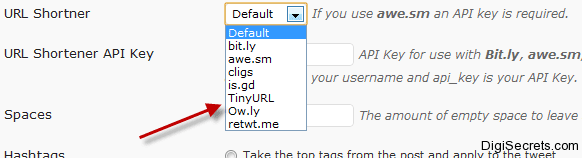
To add su.pr to the menu you have to add one piece of code in plugin’s PHP File. (Below Tutorial)
Goto your file manager using FileZilla goto the Directory where the plugin is installed
you can check /wp-content/plugins/tweetmeme
now in this Directory you will see 5 files.(twitter.php, tweetmeme.php and 3 others )
1.Download and backup “tweetmeme.php”
2.now open tweetmeme.php using notepad++
3.Search and Locate “<select name=”tm_url_shortner”>”
4. add the below code just below <select name=”tm_url_shortner”>
<option <?php if (get_option('tm_url_shortner') == 'su.pr') echo 'selected="selected"'; ?> value="su.pr">su.pr</option>
5.Save and upload to tweetmeme directory and replace it with tweetmeme.php
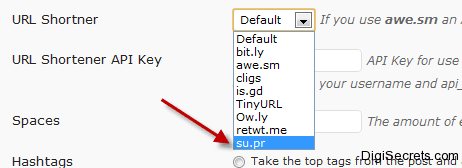
The Above mentioned Code will add su.pr to tweetmeme -> URL shorther  (You can See Clearly in Screen Shorts)

Now Goto Tweetmeme plugin -> Settings for Button -> URL Shortner Select su.pr and give your su.pr API key in URL Shortener API.
All Done! now if you are any of your readers Tweet using Tweetmeme Button the Stumble Upon Shortener is used this will drive more traffic to your blog from Twitter and Stumbleupon.
Here is the Screenshot of Tweetmeme with su.pr Link.
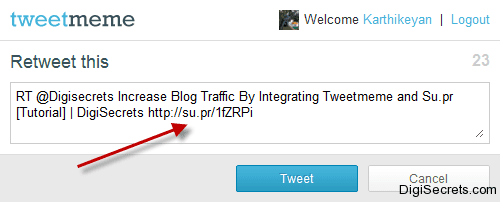
FOR LIVE DEMO CHECK OUT MY TWEETMEME BUTTON.
NOTE : BE QUICK TO SUBMIT YOUR LINK IN STUMBLE UPON ONCE YOU PUBLISHED THE POST.
Do you Like this Tip and Tutorial, If you Need Further Assistance leave a Comment..
This is an awesome trick! Maybe I should use TweetMeMe.
May be! Soon i will try for twitter button too!
very Nice tutor Karthy..
Su.pr and tweetmeme integration will helps in driving lot of traffic to a blog..
Engage in any RT club to gain much traffic and RT….
— Sudharsan @ Technoskillonline
Thanks Buddy!
Hi Karthi, Nice tutorial which helps me lot. Will try to integrate now. 🙂
Thanks for sharing this article.:)
Goutham.
Thanks for the Comment Man!
I use Tweetmeme .Thanks for the tutorial :).
You are always Welcome 🙂
Thanks a lot bro, great tutorial. By reading your post, I’ve noticed I missed a few step for integrating Tweetmeme and Su.pr, but thanks this tutorial I hope to fix it.
Thanks and I Hope you Solved the problem!
Awesome tutorial mate, I have finally integrated it in my blog 😉
Thanks and Congrats for integrating su.pr with tweetmeme 🙂
TweetMeme and Su.pr both are important. Nice tutorial! 🙂
would be adding it soon to my blog! thanks!
Cool tutorial bro !
But is it possible to integrate supr with official twitter button ?
Becoz , the new twitter button looks more nice than tweetmeme
Another thing , please share how to insert digg, stumbleupon , digg and twitter buttons in posts 🙂
Yes you can! you can also use plugins for inserting other sharing buttons!
Nice post KS but I need to ask a question.
Is it possible to tweet with my own domain name (by using tweetmeme etc.) ?
Please do reply.
own domain ? or ur own short URL? Using short URL is better option, coz twitter allows only 160 Chars, other thankg u must get a shortener to use with your own domain!
I have been using su.pr over a period of time and its one of the best way to drive traffic. But never tried Tweetmeme, Will try it out, thnx a lot bro for sharing 😀
nice tip..just updated my tweetmeme plugin with su.pr support..thanks for sharing