Change Your Keyboard Key Location To Another Key

IF you have any problem on any key of your keyboard,, Then Just exchange it with another by using the soft.Its Fun to Play & Best When you Need :DProduct Features :* Map up to 104 different keys to other key or disable them altogether * Use your keyboard to select keys to map or select from an exhaustive list of supported keys * No drivers are every loaded as it's a part of Windows * Includes options for extended keys including … [Read more...]

How to Install Unsigned Application in Nokia

Unsigned Nokia

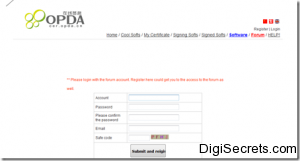
Nokia OS Wont allow you to install any unsigned applications In Your Mobile.. It Will Show Certificate Error.. You Have to Sign These Applications By Obtaining Key file and Certificate File..Get Certificate and Key file From http://cer.opda.cn/en/index.php??module=index1. Click Register and Create Your Username And Password.2. Now Click Login Enter Details..3.After Login -- Click My Certificate -Apply Cer ( Orange … [Read more...]

Hide All Icons in System Tray

Run the Registry Editor and Go toHKEY_CURRENT_USER/Software/Microsoft/Windows/CurrentVersion/Policies/Explorer.Create a new DWORD called  NoTrayItemsDisplay.Assign it a value of 1. (0= keep the icons displayed.) Exit the Registry and reboot. … [Read more...]

Are you sick of seeing the same tips again and again when you first logon to Windows?

Now you can change them to whatever you want, whether it's quotes, jokes or a to-do list, anything is possible.Open your registry and find the key below.HKEY_LOCAL_MACHINE\ SOFTWARE\ Microsoft\ Windows\ CurrentVersion\ Explorer\ TipsCreate a new string valued named by incrementing the existing value names and set it to the required tip text. … [Read more...]

Text prediction in Windows Command Prompt

Linux and certain UNIX shells has the ability to predict user keystroke.If You are typing a directory name or a filename and if it exists, using this feature would help you in avoiding those extra keystrokes.If you think that only these Operating Systems have these features? then you are wrong!!.Windows XP command environment has this feature.You have to use TAB key.Assume you are in C:\drive and want to type autoexec.bat and … [Read more...]

How to Rename the Recycle Bin

To change the name of the Recycle Bin desktop icon, open Regedit and go to:HKEY_CLASSES_ROOT/CLSID/{645FF040-5081-101B-9F08-00AA002F954E}and change the name "Recycle Bin" to whatever you want (don't type any quotes). … [Read more...]