Sharebar adds a dynamic and fully customization vertical box to the left of a blog post that contains links/buttons to popular social networking sites. This ShareBar adds more beauty to your blog :). This Sharebar Automatically Chooses how to show the bar according to the site width.
For the Wide Blog vertical floating bookmarking bar is shown, if the page size is reduced horizontal share bar is Shown Below Post. This Plugin is easy to use and you easily customize this plugin by accessing share bar under settings in wordpress admin. I am Using this share bar and its working fine..
By Default Twitter, Facebook, Digg, buzz and email are given you can also add any buttons of your wish by clicking ADD NEW BUTTON
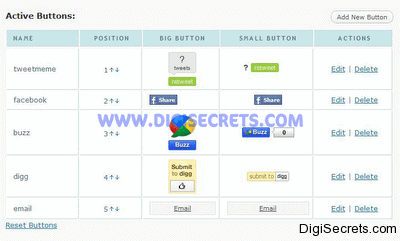
In Add New Button Paste the Share Button Code for both big and small button and Click add!
In this i am Adding Codes to add Stumble Button.

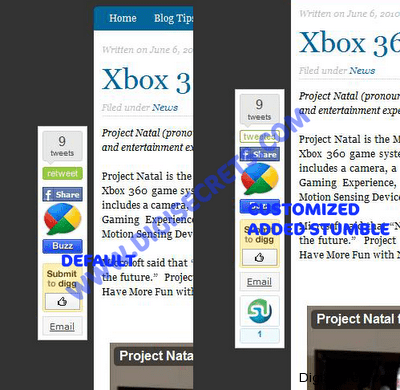
In This Screen Shot You Can See the Difference Between Default Bar and Customized One (Stumble Added)
I Hope u Like this Plugin! 🙂
Oh its easy in wordpress.
Cool plugin 🙂 will use it.
Thanks for including my work 🙂
Welcome Buddy 🙂
Well..not a wordpress user still it looks a good one to me. Thanks for this info. Keep it up 🙂
You can read my post on how to add floating social bookmarking bar on blogger @ http://www.bloggermint.com/2010/06/mashable-like-floating-social-bookmarking-widget-for-blogger/
Thanks Bro!! Try the Widget For Blogger !
Looks gr8 , i hope some one makes it blogger compatible as well 🙂
U can Get tutorials for Blogger From
http://www.bloggermint.com/2010/06/mashable-like-floating-social-bookmarking-widget-for-blogger/
Seems nice plugin, will try to implement if it suits to my site. Thanks for sharing.
Thanks Arun! this Plugin Works Fine !
I once design this myself through coding, the one problem I found – this floating bar create problem when people use low resolution if you are using a fixed width theme. That’s why I removed it.
i tried this Plugin and i am Using it! if the Resolution is low automatically small icons are showed up under Post title! 🙂
not working in mine 🙁
followed instructions
Great post Karthikeyan! I was just looking for this plugin. Now I will try to install it on my blog. Very useful. I just hope it works on my site.
Thanks Bro! this Works Fine!! 🙂
Seems to be a nice plugin for those who really need it!
Thanks Hesham! 🙂
Wow, this is pretty cool. But I really wanna know how much compatible it is with Internet Explorer 6. I have seen most of the floating bookmarks plugin going at the bottom of the page in IE6
Works Fine in Chrome and Firefox! Dont Know About IE! i Hate IE and Don’t Use that 🙂
i was looking for this information. nicely explained. will get this in my blog soon
Thanks Himanshu! this Plugin is Really Good to Use !
Already download.. just want to try use this social plugin..
Floating bookmarking plugin looks good. It adds some great changes with the site. I’m glad it will work with the two known browsers.